



Restaurants and cafés
Keep the counter moving.
Keep the menu, the order and the handover connected, so your team can serve the next customer without losing track of the last one.
Explore your workspace
Double espresso · 180 ml
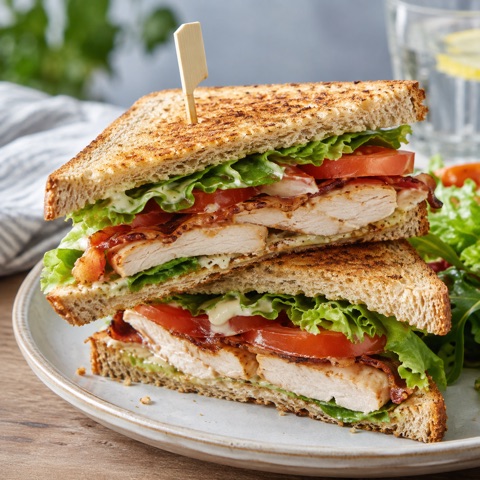
Chicken & greens · takeaway

Fresh orange · 250 ml
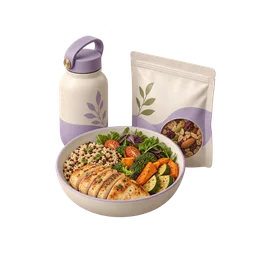
The morning counter
Follow the work · Riwaq Café
Three lunchboxes left. Keep the next order straight.
It is 12:15 at Misk Café. A flat white is on order MC-1042, while only three lunchboxes remain. The counter needs the right item, a recorded sale and an honest view of what can still be sold.
Can the counter promise another lunchbox?
Find the item before the queue grows.
The flat white, lunchbox and juice have their own names and prices. The counter can build MC-1042 without searching through a second menu.
Explore the example rangeCatalogue · Riwaq Café
Flat white
Double espresso · 180 ml
- Rate
- per item
- Available quantity
- 12
Example snapshot · MC-1042
Record the order once.
Start with the flat white, add a lunchbox and inspect the basket before completing the illustrative sale. The same quantities change in the workspace’s stock view.
Try the sample basketMC-1042 · Omar
Order MC-1042
Flat white
1.500
Example snapshot · MC-1042
Count what can still be served.
Three lunchboxes remain before this order. Inspect the exact product count before promising the next one; this example tracks menu items rather than recipe ingredients.
Inspect recorded stockStock
1 · Low stockFlat white
12 · Double espresso · 180 ml
Lunch box
3 · Chicken & greens · takeaway
Fresh juice
8 · Fresh orange · 250 ml
Example snapshot · MC-1042
Restaurants and cafés
Try the workflow yourself.
Choose a step to open the relevant screen. Explore the example at your own pace; changes stay in this preview.
Illustrative data. Explore the workflow.
Revenue
Estimated profit
Sales
Open actions
Sales trend
16 October 2026 · recorded example day
Can the counter promise another lunchbox?
Recent activity
Flat white
Double espresso · 180 ml
Lunch box
Chicken & greens · takeaway
Fresh juice
Fresh orange · 250 ml
MC-1042 · Omar
Order MC-1042
Flat white
1.500
Lunch box
3.500
Fresh juice
1.800
Delivery
Packed for collection
Omar · Riwaq Café
Packed for collectionWith the delivery team
Reem · Riwaq Café
With the delivery teamHanded over
Ahmed · Riwaq Café
Handed overChanges stay in this demonstration.
Stock
1 · Low stockFlat white
12 · Double espresso · 180 ml
Lunch box
3 · Chicken & greens · takeaway
Fresh juice
8 · Fresh orange · 250 ml
Customer
Omar
LoyaltyOrders
Total spent
Last visit
3 of 10 loyalty stamps
Purchase history
Flat white
02 / 10 / 2026 · 1 ×
Lunch box
09 / 10 / 2026 · 1 ×
Flat white
16 / 10 / 2026 · 1 ×
Team
Noura
Owner · all access
Mariam
Manager · assigned branch
Salim
Staff · permitted modules
Features depend on enabled apps, permissions and your plan.
Mariam's access
16 October 2026 · recorded example day
Estimated profit
Revenue
Expenses
Where the money went
Stock purchasing
Team & studio
Packing & operations
The storefront could not load. Open another screen and try again.
Open the example storefrontMAKSEB
Apps
Features depend on enabled apps, permissions and your plan.

Customers
Available
Accounting
Available
Website
Available
Delivery
Available
Loyalty
AvailableRestaurants and cafés
Before you choose your workflow
Can the team use the same items at the counter and online?
Use the catalogue for the items you sell and publish the intended range through the enabled website app. Check stock, prices and visibility before accepting orders.
What happens to stock after a sale?
The example records a basket and reduces the quantities of its products. In your workspace, inspect the resulting sale and stock movement after a small test transaction.
Can different staff have different access?
Give staff the modules and branches they need. Check their actual permissions before asking them to record sales, manage the catalogue or review financial information.
Restaurants and cafés
Put your next service on a clearer footing.
Add your menu, record one small order and check the exact quantities left for service.
14 days free. No credit card required.
Enabled apps, your plan and permissions determine which workflows are available.